
The MCP Mock Server: AI Agents That Create Their Own Test Doubles
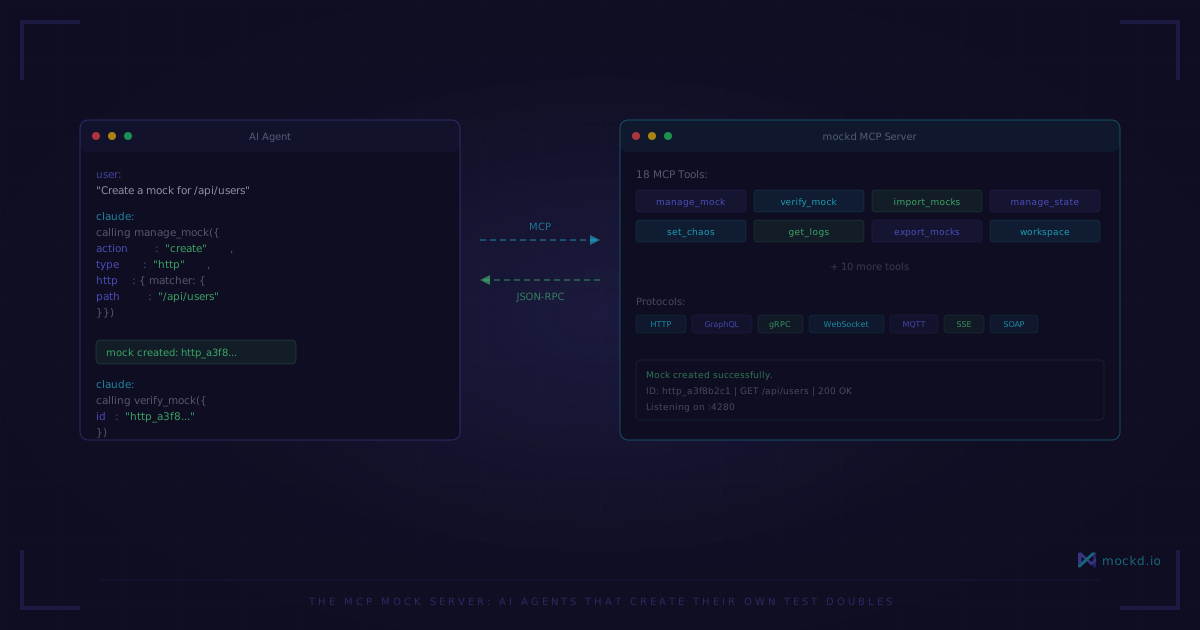
18 MCP tools that let Claude, Cursor, and any AI assistant create, manage, and verify mock APIs without leaving the conversation. No CLI commands, no context switching.
Last week I watched Claude Code try to set up a WireMock instance. It found the Docker image, wrote a docker-compose.yml, pulled the image, started the container, wrote a mapping JSON file, copied it into the container, restarted the container — and then the port mapping was wrong. Fourteen steps, four minutes, and it still didn’t work.
Then I typed: “Create a mock for GET /api/users that returns a list of users.”
{
  "action": "create",
  "type": "http",
  "http": {
    "matcher": { "method": "GET", "path": "/api/users" },
    "response": {
      "statusCode": 200,
      "body": "[{"id": "{{uuid}}", "name": "{{faker.name}}"}]"
    }
  }
}
One MCP tool call. Mock is live on port 4280. The agent never left the conversation.
That’s the difference between an agent using a mock server and an agent that has a mock server. mockd ships 18 MCP tools that turn any AI assistant into a self-sufficient integration tester.
Three lines of config
The entire setup for Claude Code, Cursor, Windsurf, or any MCP-compatible agent:
{
  "mcpServers": {
    "mockd": {
      "command": "mockd",
      "args": ["mcp"]
    }
  }
}
That’s it. mockd mcp starts an MCP server over stdio. If no mockd instance is running, it auto-starts a background daemon on ports 4280 (mock server) and 4290 (admin API). If one is already running, it connects to the existing instance. Zero flags needed.
mockd is the only mock server published on the official MCP Registry (io.mockd/mockd). Not WireMock, not Mockoon, not json-server, not Prism. None of them have MCP tools.
The 18 tools
Your agent discovers these automatically through the MCP protocol. Here’s how they break down by category:
Mock CRUD — The ones the agent reaches for constantly.
manage_mock— Create, list, get, update, delete, toggle mock endpointsimport_mocks— Import from OpenAPI, Postman, HAR, WireMock, cURL, or YAML/JSONexport_mocks— Export all mocks as YAML or JSON
Observability — How the agent knows what happened.
get_server_status— Server health, ports, and statsget_request_logs— Captured request/response logs, filterable by method, path, mock ID, protocolclear_request_logs— Wipe logs between test runs
Verification — How the agent proves its code works.
verify_mock— Assert a mock was called N times (exact, at_least, at_most)get_mock_invocations— Full request/response pairs for a specific mockreset_verification— Clear counters between test scenarios
Chaos — How the agent stress-tests its own error handling.
get_chaos_config— Current fault injection config and statsset_chaos_config— Inject latency, errors, or use named profiles likeflaky,slow-api,offlinereset_chaos_stats— Reset injection countersget_stateful_faults— View circuit breaker, retry-after, progressive degradation statesmanage_circuit_breaker— Manually trip or reset circuit breakers
Stateful Resources — When the agent needs mocks that remember.
manage_state— CRUD resources: overview, add_resource, list_items, get_item, create_item, reset, delete_resourcemanage_custom_operation— Register and execute custom operations on stateful resources
Context — manage_context switches between multiple mockd servers. manage_workspace creates and switches workspaces that provide true isolation of mocks, stateful resources, and request logs within a single server.
The verification workflow
This is the pattern I see agents use most. Three steps, no human involved.
Step 1: The agent creates a mock.
{
  "action": "create",
  "type": "http",
  "http": {
    "matcher": { "method": "POST", "path": "/api/orders" },
    "response": { "statusCode": 201, "body": "{"id": "order_001"}" }
  }
}
Step 2: The agent writes application code that calls this endpoint, then runs the tests.
Step 3: The agent verifies the mock was called exactly the right number of times.
{
  "id": "http_abc123",
  "expected_count": 3
}
If the count is wrong, the agent knows immediately. It doesn’t need to read test output or parse logs. verify_mock returns a pass/fail with the actual count and invocation details. The agent fixes the code and tests again.
Near-miss debugging
Here’s something that saves agents (and you) serious time. When code hits the mock server but doesn’t match any configured mock, get_request_logs with unmatchedOnly tells you exactly why:
{
  "unmatchedOnly": true
}
The response includes near-miss analysis — which mocks almost matched and what was different. Path was /api/user instead of /api/users. Method was POST instead of GET. Header Content-Type was missing.
Agents are great at fixing problems when they know what the problem is. Near-miss analysis turns “my request didn’t work” into “your path has a typo.” The agent fixes it in one shot.
Chaos in one line
When the agent wants to test how its code handles failure:
{
  "enabled": true,
  "profile": "flaky"
}
The flaky profile injects random 500/502/503 errors and intermittent latency spikes. The agent runs its test suite against this, watches what breaks, and fixes the error handling.
Named profiles cover common scenarios: slow-api adds latency, offline returns connection errors, rate-limited returns 429s, mobile-3g throttles bandwidth. For precise control, the agent can configure exact error rates, latency ranges, or advanced rules like circuit breakers and progressive degradation.
The self-sufficient loop
This is the workflow that changes everything. No human touches the mock server at any point.
- Agent reads the project’s OpenAPI spec
- Agent calls
import_mocksto scaffold all endpoints from the spec - Agent writes application code against
http://localhost:4280 - Agent runs tests
- Agent calls
get_request_logsto check for unmatched requests - Agent sees a path mismatch, fixes the code
- Agent calls
verify_mockto confirm call counts - Agent calls
set_chaos_configto test error handling - Agent runs tests again, fixes retry logic
- Agent calls
reset_verification, runs final test suite, verifies everything passes
The agent provisioned its own test infrastructure, iterated against it, debugged itself using the mock server’s observability tools, and validated its work. You reviewed the PR.
What’s not perfect yet
I think honesty matters more than hype here.
MCP is still early. The protocol works well for tool calls, but agent support varies. Claude Code handles all 18 tools without issues. Other agents may not surface all tools or may struggle with the larger parameter surfaces on tools like manage_mock and set_chaos_config.
Tool responses can be large. If you have 50 mocks configured and the agent calls manage_mock with action: "list", that response eats context window. Use targeted get calls and keep your mock count reasonable per workspace. Workspaces now provide true isolation — each workspace has its own mocks, stateful resources, and request logs, so splitting work across workspaces keeps individual tool responses manageable.
The daemon outlives the session. mockd mcp auto-starts a background daemon, which is great until you forget it’s running. The daemon doesn’t shut down when the MCP session ends. Run mockd stop when you’re done, or port 4280 will still be occupied next time.
stdio only. The MCP transport is local stdio — your machine, your agent. No remote MCP transport yet, so this is single-developer, not team-wide. For shared mocks, you’d export and commit the YAML config to your repo.
Learn more
- Part 1: Your AI Coding Agent Needs a Dev Environment Too — The case for mock infrastructure in AI development
- Part 3: The Mock Server Is the First Environment in Your Pipeline — Enterprise perspective: mock environments as a pipeline stage
- MCP setup guide — Install mockd and connect it to your agent in under 60 seconds
- All features — MCP server, AI mock generation, 7 protocols, recording proxy, and more
Links
- GitHub: github.com/getmockd/mockd (Apache 2.0)
- MCP Registry: io.mockd/mockd
- Docs: docs.mockd.io
- Install:
brew install getmockd/tap/mockdorcurl -fsSL https://get.mockd.io | sh
Try mockd
Multi-protocol API mock server. HTTP, gRPC, GraphQL, WebSocket, MQTT, SSE, SOAP.